> For the complete documentation index, see [llms.txt](https://amoebatech.gitbook.io/amoebatech-docs/llms.txt). Markdown versions of documentation pages are available by appending `.md` to page URLs; this page is available as [Markdown](https://amoebatech.gitbook.io/amoebatech-docs/technical-blogs/deep-dive-into-bluetooth-low-energy-ble.md).
# Deep Dive into Bluetooth Low Energy (BLE)
***
**Lets understand one of the most used Bluetooth Technology in IoT devices specially in Consumer, Automotive & Healthcare domain. Here detaily discussed about it’s modes, architecture, pairing mechanisms. Finally talk about commonly present vulnerabilities in the BLE protocol.**
#### Types of Bluetooth & it’s modes
***
There are two types of Bluetooth technology: Classic Bluetooth and Bluetooth Low Energy (BLE). The primary distinction between them lies in their versions — Bluetooth versions 1.0 to 3.0 fall under Classic Bluetooth, while Bluetooth 4.0 and later support both Classic and BLE. Bluetooth devices operate in various modes and states, each designed to optimize visibility, power consumption, or security. Understanding these fundamental Bluetooth features is essential for leveraging its capabilities effectively.
***What are Connection Modes ?***
These modes describe the state of the Bluetooth connection:
* **Unpaired Mode:** The device is not paired or connected to any other Bluetooth device.
* **Paired Mode:** The device is paired with another device, and their information (e.g., MAC addresses, pairing keys) is stored, allowing automatic future connections without re-pairing.
* **Connected / Trusted Mode:** The device is actively connected to another paired device and can exchange data. For example, a Bluetooth speaker or headphone would be in this mode when playing audio.
***What are Visibility Modes ?***
These modes determine whether a Bluetooth device is visible and discoverable by other devices.
* **Discoverable Mode (Broadcasting) :** The device is actively broadcasting its presence and is visible to other Bluetooth devices. Other devices can find it and initiate pairing. However, once a device is paired and the connection is established, it usually stops broadcasting its presence to other devices.
* **Non-Discoverable Mode (Observing) :** The device is not broadcasting its presence and is invisible to unpaired devices. Only previously paired devices can connect to it. However, devices that have already been paired can still initiate a connection without needing discovery mode.
***How many Power Modes ?***
These modes are related to the power consumption of Bluetooth devices
* **Active Mode:** The device is fully powered, connected, and actively communicating with another Bluetooth device. It consumes the most power in this mode.
* **Sniff Mode:** The device remains connected but reduces power consumption by reducing the frequency at which it communicates. It periodically “sniffs” the connection to maintain it while conserving energy.
* **Hold Mode:** The device maintains its connection but stops data transmission temporarily to save power. This is often used when there’s no active data transfer needed for a short time.
* **Park Mode:** In park mode, the device remains synchronized with the network but is not actively participating. It consumes the least power, and the device can resume activity when needed. It’s like a “sleep” mode.
***How many Security Modes ?*** Bluetooth defines several security modes to manage authentication, encryption, and privacy during connections.
* **Security Mode 1:** No security. No authentication or encryption has been used.
* **Security Mode 2:** Unauthenticated pairing with encryption has been used
* **Security Mode 3:** Devices authenticated and encrypted at the beginning of a connection.
* **Security Mode 4:** Authenticated LE Secure pairing with encryption using a 128-bit strength encryption key (AES-CCM)
#### **BLE Architecture & Its Stack**
***
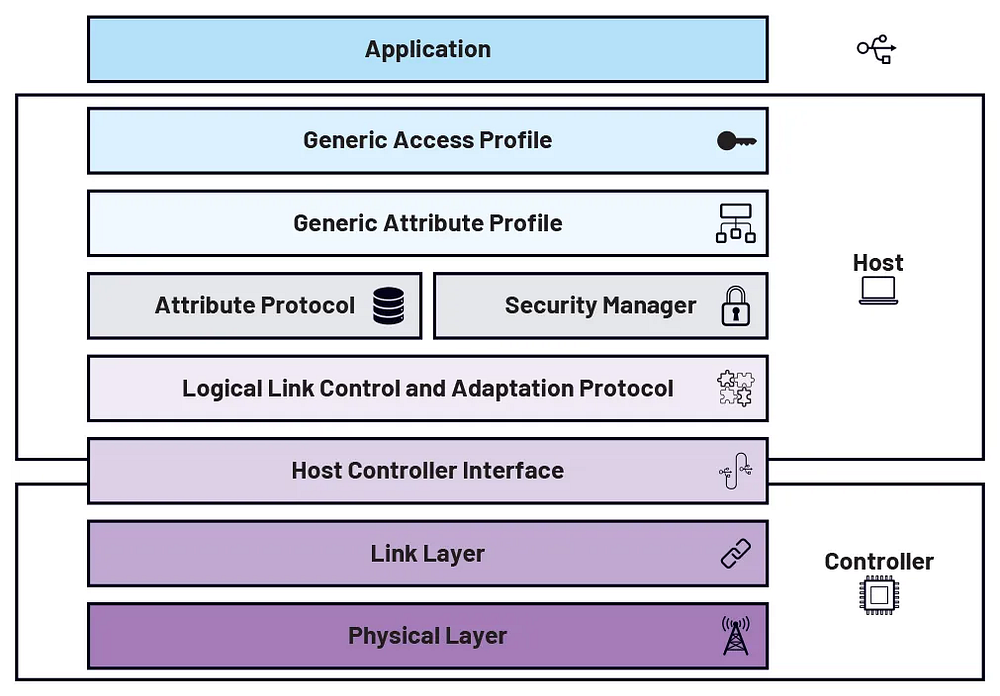
The BLE stack architecture is typically divided into three main layers: the application layer, the host layer, and the controller layer.
> We will tear down each stack from Top (Application) to Bottom (Physical)
#### **Application**
The application layer is where the specific functionality of BLE-enabled devices is implemented. It interacts with the lower layers of the stack through the generic attribute profile (GATT), which allows the definition of services, characteristics, and the corresponding data. The application layer essentially customizes the BLE stack to meet the specific requirements of the device and its intended use cases.
#### **Host**
The host layer, which contains the remaining upper layers of the BLE stack, includes Logical Link Control and Adaptation Protocol (L2CAP), Security Manager Protocol (SMP), Attribute Protocol (ATT), GATT, and Generic Access Profile (GAP).
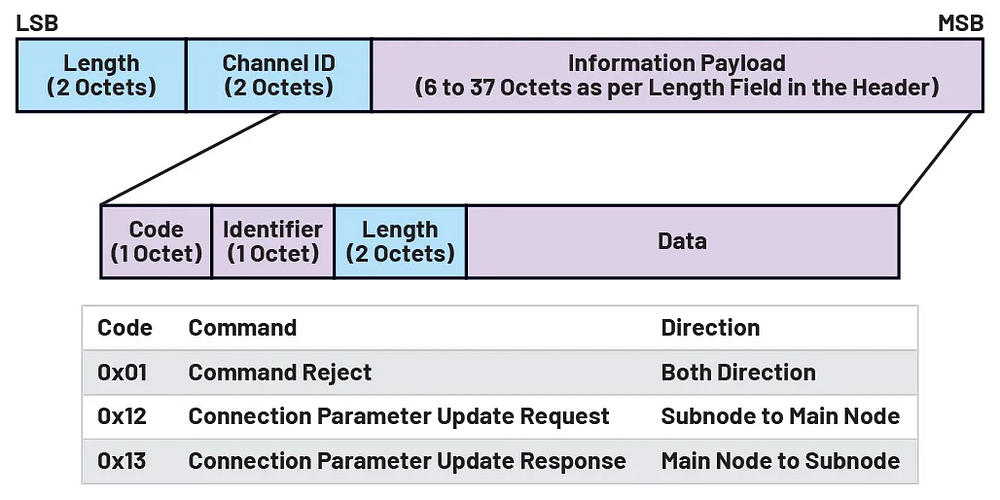
1. ***L2CAP*** acts as an interface between the higher layer protocols and the lower layers. It works for data exchange & integrity using request & response commands.
L2CAP Frame Format
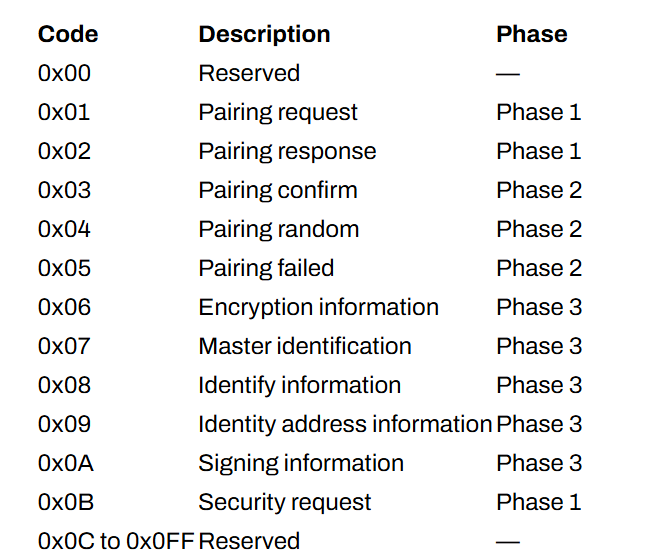
***2. Security Manager Protocol (SMP)*** defines the procedures for pairing, authentication, and encryption between BLE devices. SMP commands use the L2CAP services to carry out these procedures. The SMP command packet consists of a code field and data field. The code field identifies the type of the command, while the data field’s length and format depend on the command type. All SMP procedures implement a 30-second timeout, which is used to tell if a procedure has failed.
SMP Command Codes
> **These phases are parts of the pairing mechanism, total 3 phases of pairing mechanism used in BLE.**
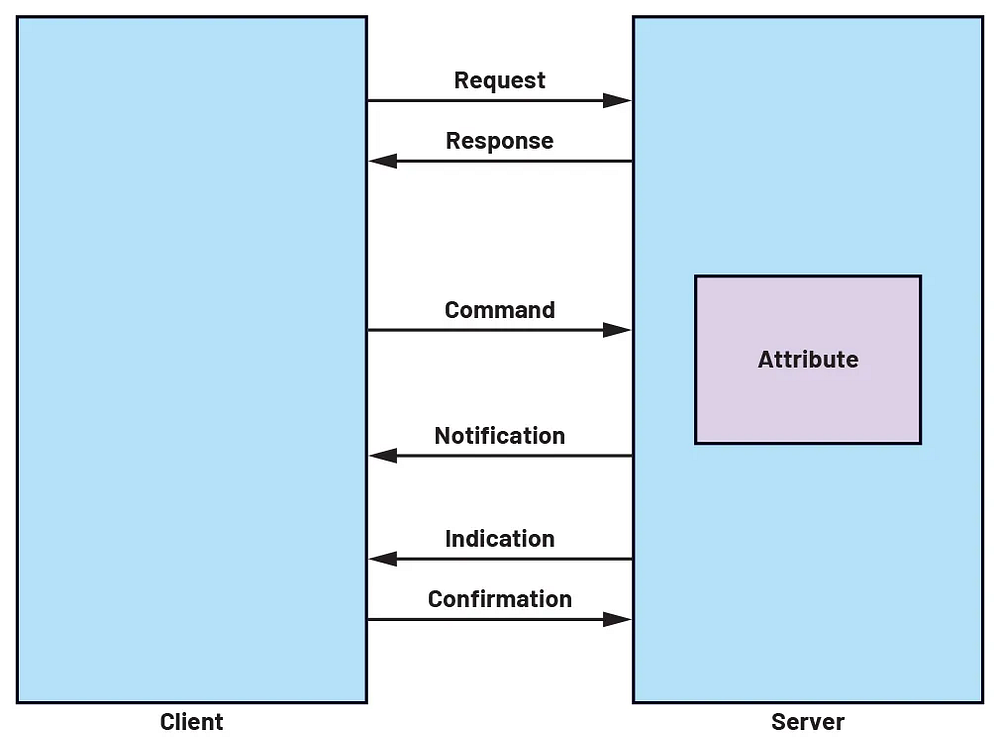
***3. Attribute Protocol (ATT)*** follows a client-server model. The server exposes a set of attributes while the client can discover, read, and write on those attributes. An attribute structure in ATT consists of a handle, type, value, and permissions. An attribute handle is a unique nonzero value assigned to each attribute on the server. The attribute is identified by a Universally Unique Identifier (UUID) — 16 bits as assigned by the Bluetooth Special Interest Group (SIG) or a custom 128-bit UUID.
ATT defines six PDU types: request, response, command, confirmation, notification, and indication. These PDU types enable the exchange of information and control between the client and server in the ATT layer at the BLE stack.
Different Attribute PDU types
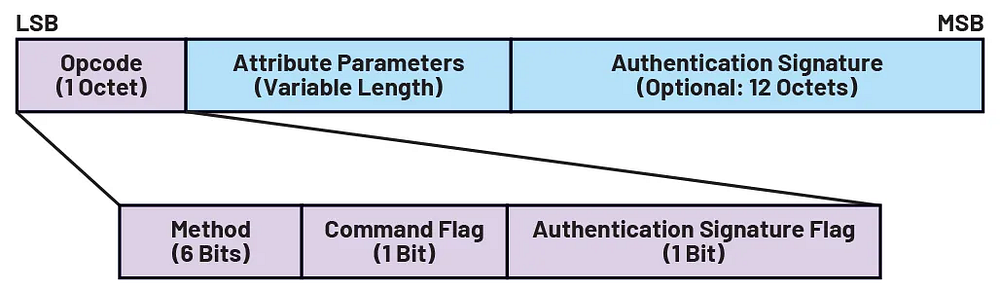
An ATT PDU packet is structured with an opcode, attribute parameters, and authentication signature. The opcode field identifies the method/type of PDU, such as a request or response. It also includes a command flag to indicate if the PDU is a command and an authentication signature flag that indicates the usage of an authentication signature in the packet.
ATT PDU Packet Format
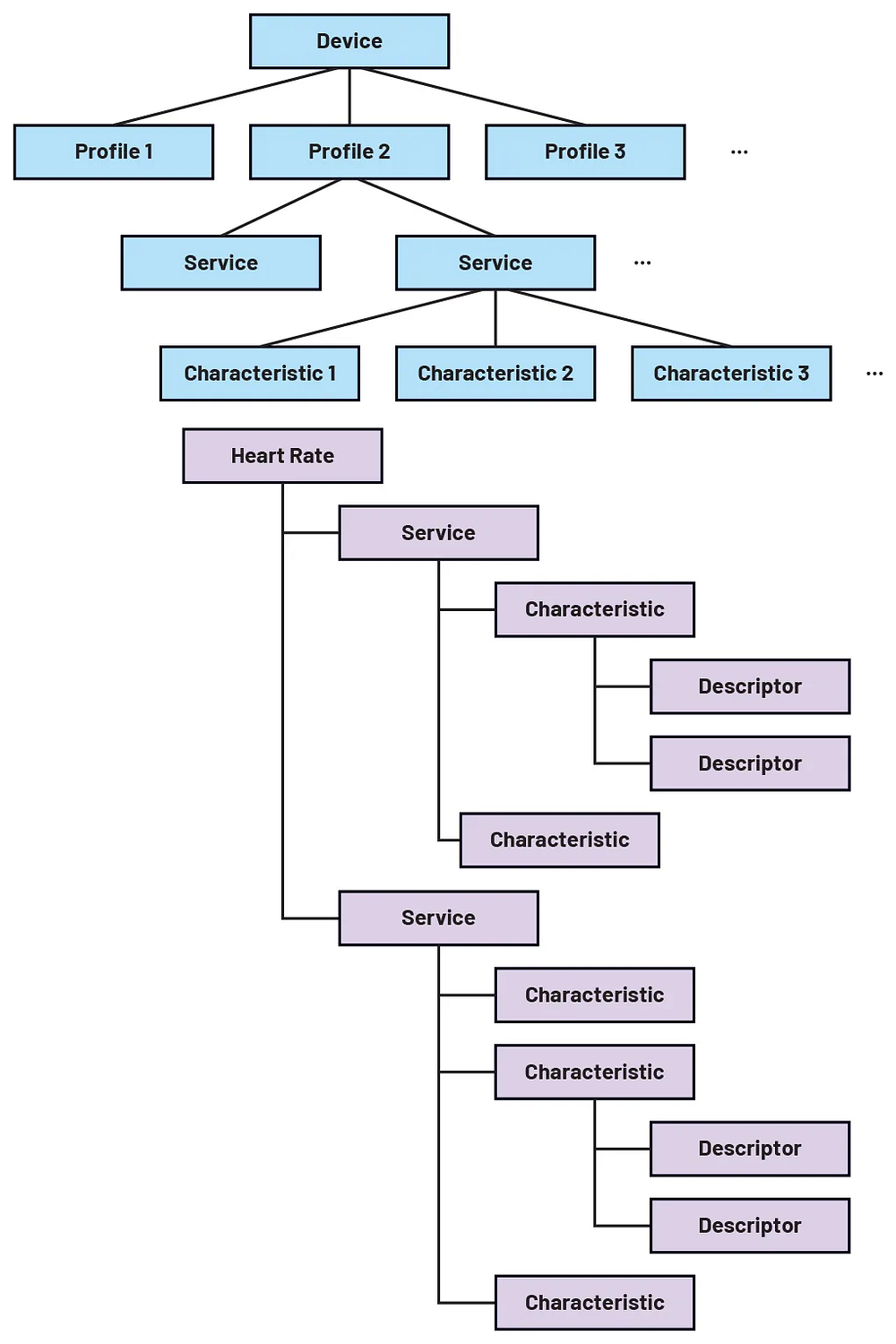
***4. GATT*** defines how data or attributes are formatted, packaged, and exchanged between connected devices. GATT procedures consist of attribute discovery, read, write, notification, and indication. It provides a standard framework for managing data in a BLE device. Multiple GATT profiles exist in a BLE device with manufacturer & custom option as per requirement.
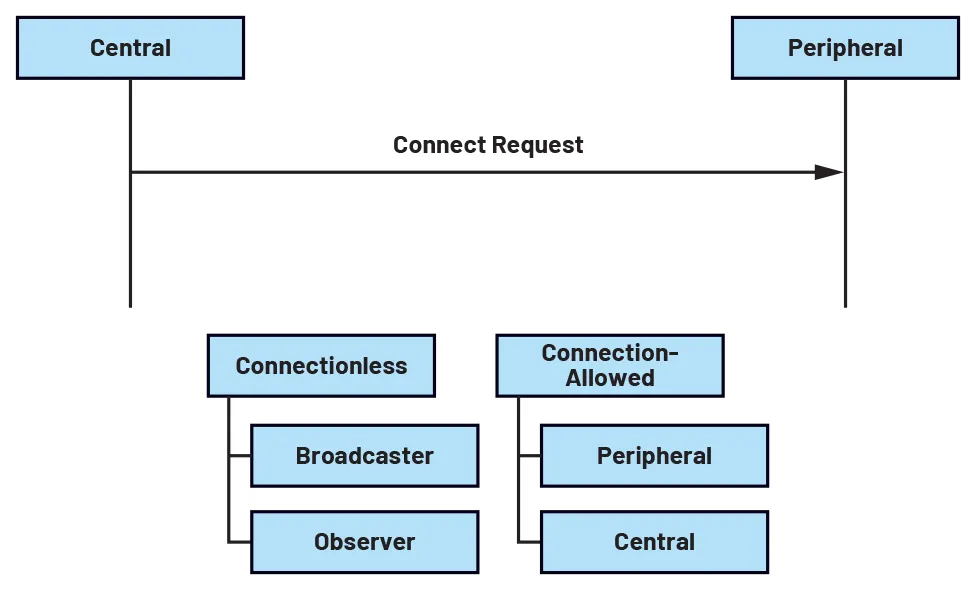
***5. GAP*** is the top of the host layer, it defines how BLE devices access and communicate with each other. It is required to be implemented for all devices that support Bluetooth technology since it provides the standard framework for controlling a BLE device. It provides a different role for a BLE device based on its activity. When no connection is required, a BLE device can act as a broadcaster or an observer.
When a connection can be established, GAP provides two additional roles for a BLE device: peripheral and central.
* The peripheral device, similar to the broadcaster, advertises itself and awaits a connection request from a remote central device.
* The central device, on the other hand, acts as an observer, scanning for peripherals and initiating connection requests to the desired peripheral.
As mentioned before, examples of a peripheral device are smartwatches, fitness trackers, and home automation sensors, while examples of central devices are smartphones, tablets, and laptops.
As a profile, GAP includes a service that is hosted by the GATT server, as mandated by the Bluetooth specification. The GAP service encompasses various characteristics that provide essential information about the device. These characteristics typically include the device name, device appearance, peripheral preferred connection parameters, central address resolution, and resolvable private address only.
#### **Host-Controller Interface (HCI)**
The HCI serves as an intermediary between the host and the controller. It provides a standardized set of commands and events that enable communication between these two layers.
#### **Controller**
The controller contains two layers: the link layer and the physical layer.
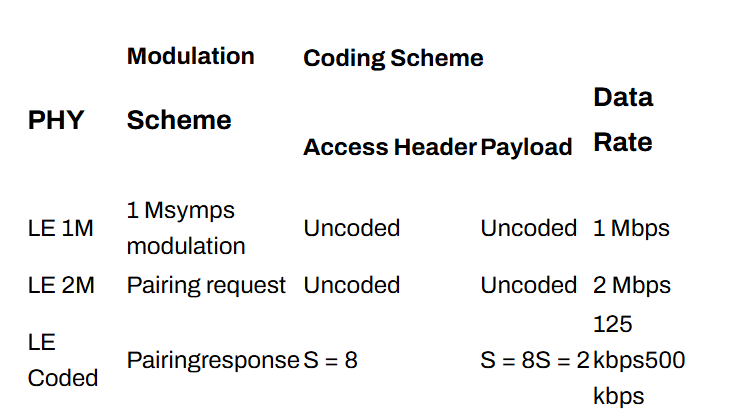
1. **Physical layer** is positioned at the bottom of the BLE stack and is responsible for the actual transmission and reception of the signal over the air. Operating in the 2.4 GHz ISM band, the physical layer uses a Gaussian frequency shift keying (GFSK) modulation.
Different Modulation Coding Scheme
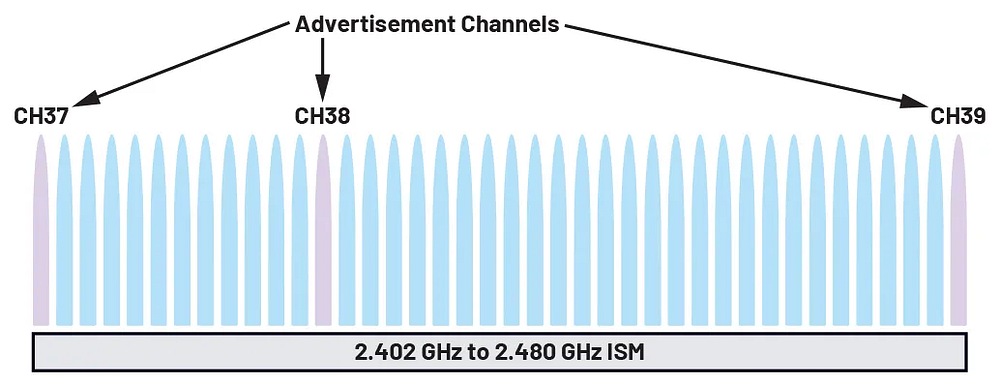
The physical layer consists of 40 channels, each spaced 2 MHz apart from one another: 3 advertising channels are used for broadcasting short packets of data to announce the presence of the advertiser and its available services. On the ether hand, 37 data channels are used once a connection is established between a central and a peripheral.
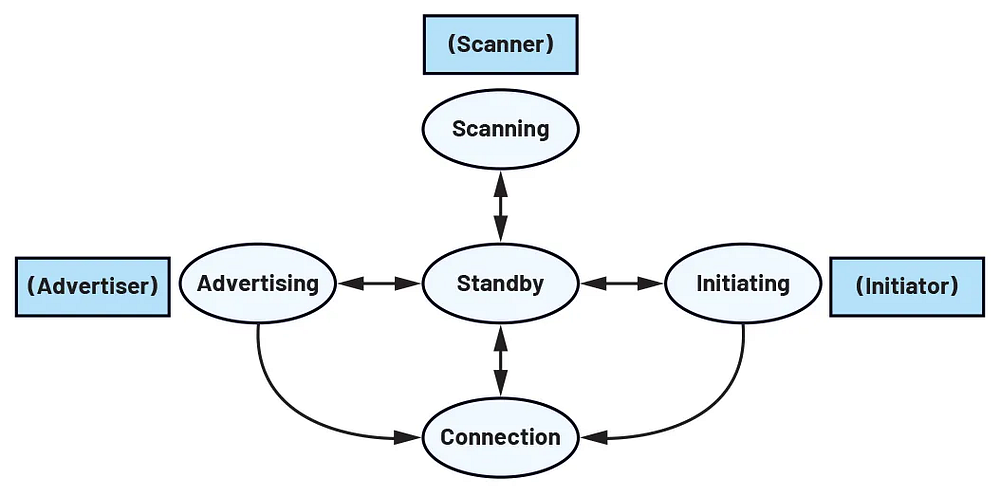
**2. Link layer** is responsible for scanning, advertising, creating, and maintaining connections between devices. The link layer also manages frequency selection for data transmission, utilizing frequency-hopping spread spectrum to mitigate interference. The link layer has different states: standby, advertising, scanning, initiating, and connected
* In a standby state, the link layer is idle where there are no packets received or transmitted
* In the advertising state, the link layer (acting as an advertiser) transmits advertising packets while listening to devices that request additional information.
* In the scanning state, the link layer (acting as a scanner) listens for advertisers and may request additional information from them.
* In initiating, the link layer (acting as an initiator) listens to the packets from the advertiser and responds to those packets by initiating a
* The connected state is when the link layer is connected to the link layer of another BLE device.
In addition to different states, the link layer also defines events: advertising events and connection events. Advertising events involve the transmission of packets using the advertising channels, while connection events involve the transmission of packets during the connected state through the data channels.
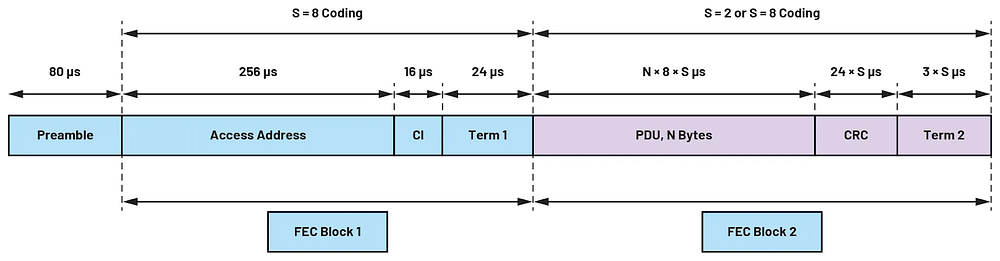
The link layer also defines the packet format of the BLE packet that will be transmitted by the physical layer. The packet format may be categorized into two types: those used for coded or those used for uncoded PHY.
A BLE packet for an uncoded PHY
A BLE packet for an coded PHY
#### **Types of Pairing Mechanism**
***
Both LE Legacy & LE Secure pairing mechanisms involve a three-phase process. Here’s a breakdown of each phase of LE Legacy pairing mechanism.
***Phase 1: Selection of Pairing Method and Association Model.***
This phase begins by determining whether LE Legacy Pairing should be used. If one or both devices have not set the Secure Connections (SC) flag in the pairing feature exchange, LE Legacy Pairing is used.
**Selection of Model:**
* The options for LE Legacy Pairing are Just Works, Passkey Entry, or Out of Band (OOB).
* It depends on the I/O capabilities of the two devices, whether OOB data is available, and whether MITM protection is required. For OOB, (TK) has been transferred through WIFI, NFC or RFID etc.
***Phase 2: Temporary Key (TK) Establishment, Authentication, and Short Term Key (STK) Generation.***
A Temporary Key (TK) has been introduced (generated) based on the association model.
* For Just Works, TK is always zero.
* For Passkey Entry, TK is based on the six-digit passkey entered by the user. (20 bits)
* For OOB, TK is a 128-bit value from the OOB data.
Authentication is performed by exchanging confirmation numbers (except for Just Works). These numbers are calculated using the TK and random values (generated by Responder & Initiator). The devices confirm that they know the TK, which provides authentication in the case of Passkey Entry and OOB.
A Short Term Key (STK) is generated using the TK, and the random numbers from both devices.
* **LP\_RAND\_R:** A random number generated by the responder (Peripheral device).
* **LP\_RAND\_I:** A random number generated by the initiator (Central device).
#### **The STK is calculated as follows:**
STK = s1(TK, LP\_RAND\_R, LP\_RAND\_I)
This STK is used to encrypt the link during key distribution in Phase 3.
***Phase 3: Key Distribution***
* The link is encrypted using a session key derived from the STK, which was calculated in Phase 2, and the keys are distributed over this encrypted link.
* Keys of whatever type the feature exchange in phase 1 indicated. This includes the Long Term Key (LTK), Connection Signature Resolving Key (CSRK), and Identity Resolving Key (IRK).
* The keys and associated values, such as the Encryption Key Diversifier (EDIV) and a Random Number (RAND), are stored in a security database for future connections, creating a bond between the devices
> The security of the STK is highly dependent on the entropy of the TK. In the case of Just Works, the TK has no entropy because it is always zero, making the STK vulnerable to attacks. The STK is only used to encrypt the link for the purpose of distributing keys in Phase 3 and is not retained for later use
Here’s a breakdown of each phase the LE Secure Connections pairing mechanism
***Phase 1: Pairing Feature Exchange and Pairing Method Selection.***
This initial phase involves an exchange of information between the two devices. It is determined if LE Secure Connections pairing should be used, which it must be if both devices support it.
**Selection of Model:**
* The options for LE Legacy Pairing are Just Works, Passkey Entry, or Out of Band (OOB).
* It depends on the I/O capabilities of the two devices, whether OOB data is available, and whether MITM protection is required.
* The types of keys that will be generated and distributed are also determined in this phase.
***Phase 2: Public Key Exchange, DHKey Calculation, and Authentication.***
This phase is different from the corresponding phase in LE Legacy Pairing.
* Public Key Exchange: Devices exchange their public keys.
* DHKey Calculation: Each device calculates a shared secret called the Diffie-Hellman key (DHKey) using its private key and the other device’s public key.
**Authentication Stage 1:** This stage may involve user interaction and is dependent on the association model selected during Phase 1. The association models for LE Secure Connections include Just Works, Numeric Comparison, Passkey Entry, and OOB.
**Just Works and Numeric Comparison:**
1. Device B generates a 128-bit nonce (random number) called Nb.
2. Device B calculates a confirmed value Cb using a function called f4, which takes the public keys of both devices, Nb, and a constant (0) as inputs. The nonce (Nb) acts as the key for the AES-CMAC message authentication code algorithm used in f4.
3. Cb is sent to device A. Device A cannot use this value yet, as it does not know Nb.
4. Device A generates a nonce called Na and sends it to device B.
5. Device B sends its nonce Nb to device A.
6. Device A recalculates the confirm value using the f4 function and compares it to the Cb it received. If they do not match, pairing is aborted.
***If Just Works is used, Authentication Stage 1 is now complete.***
For Numeric Comparison, the next step are the devices generate and display a six-digit number using a function called g2, based on the public keys and nonces. The user must confirm that both devices display the same number. This user confirmation is a form of authentication.
**Passkey Entry:**
1. There are two variants: either the user enters the same six-digit passkey into both devices, or one device displays a six-digit number and the user enters it into the other device.
2. The devices calculate, exchange, and check confirm values (Ca and Cb) iteratively. Each iteration incorporates one bit of the passkey.
3. During each iteration, each device generates a 128-bit random number (Na or Nb).
4. A confirm value is calculated using function f4, incorporating both public keys, the random number for the current iteration, and a value derived from the passkey bit. This method, called Gradual Disclosure, is used to make MITM attacks more difficult.
5. The confirm values are exchanged and checked in every iteration, with a six-digit passkey needing 20 iterations.
**Out of Band (OOB):**
1. Part of the process uses a non-Bluetooth data exchange mechanism, while the rest uses Bluetooth.
2. Both devices (or just one) generate random numbers (ra and rb) and calculate confirm values (Ca and Cb) based on their public keys and the random numbers.
3. Device A sends its address, ra, and Ca to device B using the out-of-band mechanism. Device B sends its corresponding data back to device A.
4. Once the in-band pairing begins, one or both of the confirmed values are recalculated using in-band public keys and out-of-band random numbers. The recalculated values must match the OOB received values, or the pairing will be aborted.
5. Each device calculates a nonce, Na and Nb and exchanges these values.
**Authentication Stage 2:** This stage makes further checks to ensure the public keys, random numbers, and device addresses were correctly exchanged. Importantly, this stage proceeds the same way regardless of the association model used in Authentication Stage 1.
* MacKey and LTK Calculation: Each device calculates a MacKey and the Long Term Key (LTK) using function f5.
* The inputs to f5 are the DHKey, the nonces Na and Nb, and the device addresses.
* The function f5 uses the AES-CMAC algorithm, with the DHKey as the 128-bit key.
***Check #1 (Ea):***
* Device A calculates a check value called Ea using a function f6 and sends it to device B.
* Function f6 takes the MacKey, the nonces Na and Nb and other information as input and uses the AES-CMAC algorithm, with the MacKey as the 128-bit key.
* Device B recalculates Ea and compares the result with the Ea value received. If they do not match, pairing is aborted.
***Check #2 (Eb):***
* Device B calculates a check value Eb using f6.
* Eb is sent to device A, where it is recalculated and compared to the received value. If they do not match, pairing is aborted.
* Start Link Encryption: The final step is to start encryption using the calculated LTK
This stage authenticates the devices using a process that involves their private keys. A Long Term Key (LTK) and a MacKey are calculated. This authentication is a key difference between LE Secure Connections and LE Legacy Pairing.
***Phase 3: Key Distribution***
* In this final phase, the link is encrypted using a session key derived from the LTK.
* Keys, such as IRK and CSRK, are distributed as determined in Phase 1.
#### ***Vulnerabilities & Security issues in the Bluetooth Low Energy (BLE)***
***
* **Eavesdropping:** Unauthorized devices can listen to radio transmissions and receive transmitted data, compromising confidentiality. This is especially true when encryption is not used or is weak.
* **Man-in-the-Middle (MITM)**: An attacker can insert themselves between two communicating devices, intercepting, stealing, or manipulating data. This can happen if devices are not properly authenticated during pairing.
* **Data tampering:** Transmitted data could be deliberately changed, which could be advantageous to an attacker.
* **Information Leakage:** Even when data is encrypted, the act of transmitting messages can leak information, such as the fact that two parties are communicating, the date and time of communication, and more. Error messages can also leak information if not chosen carefully.
* **Replay Attacks:** Attackers can capture packets and retransmit them later to fool devices into thinking they are part of a legitimate exchange.
* **Weak Temporary Keys (TK):** It is only possible in LE Legacy Pairing specially where models like Just Works or Passkey Entry used in the pairing mechanism. It has low entropy in the Temporary Key (TK). This makes it vulnerable to brute-force attacks. If a sniffer can determine the TK, it can compromise all the keys exchanged during the pairing process.
* **Insufficient Authentication:** If authentication is not used, or is used improperly, during the pairing process, the connection becomes susceptible to interception and modification by an attacker.
* **Brute Force / Pass Key Cracking:** The passkey size is less than 6 digit (for BLE), 8 digit (for classic). It is possible to crack the key by the attacker.
---
# Agent Instructions
This documentation is published with GitBook. GitBook is the documentation platform designed so that both humans and AI agents can read, navigate, and reason over technical content effectively. Learn more at gitbook.com.
## Querying This Documentation
If you need additional information that is not directly available in this page, you can query the documentation dynamically by asking a question.
Perform an HTTP GET request on the current page URL with the `ask` query parameter, and the optional `goal` query parameter:
```
GET https://amoebatech.gitbook.io/amoebatech-docs/technical-blogs/deep-dive-into-bluetooth-low-energy-ble.md?ask=&goal=
```
`ask` is the immediate question: it should be specific, self-contained, and written in natural language.
`goal` is optional and describes the broader end goal you are ultimately trying to accomplish on behalf of the user. GitBook uses it to tailor the answer towards what is most useful for that goal.
The response will contain a direct answer to the question and relevant excerpts and sources from the documentation.
Use this mechanism when the answer is not explicitly present in the current page, you need clarification or additional context, or you want to retrieve related documentation sections.